Blogger Default Theme: 9 Important Reasons You Shouldn’t Use It

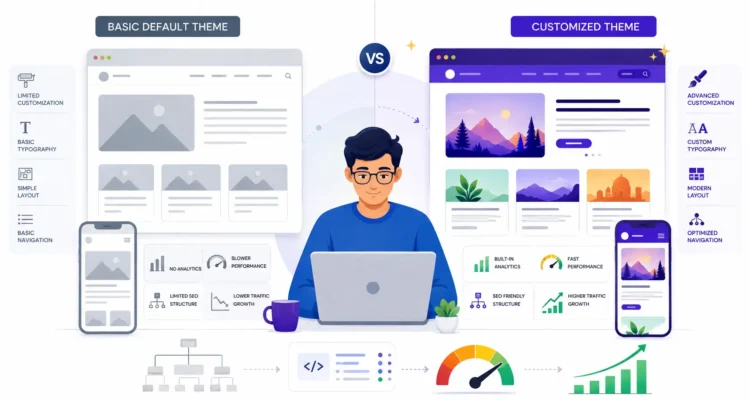
Blogger default theme comparison showing customization performance mobile design SEO and custom theme improvements

When you create a new Blogger website, one of the easiest choices is to keep a Blogger default theme and start publishing immediately. That approach is perfectly fine for testing Blogger, learning how posts work, or creating a simple personal blog. However, if you want to build a serious website with stronger branding, better design control, improved usability, and room for long-term growth, relying permanently on a Blogger default theme may not be the best choice.

The important point is that a Blogger default theme is not automatically bad for SEO. Blogger’s built-in themes are supported by Google and can be customized. The real question is whether the particular theme and configuration meet the needs of your website.

This updated guide explains why you may eventually want to replace or customize a Blogger default theme, what problems you should actually look for, which old Blogger SEO claims you should ignore, and how to choose a better theme without damaging your site.

If you are still setting up Blogger, start with our How to Create a Blogger Blog guide. You should also configure the essential Blogger settings and Blogger SEO settings before making major design changes.

Table of Contents

What Is a Blogger Default Theme?

A Blogger default theme is one of the themes available directly inside Blogger’s Theme section. These themes provide the basic visual structure for your blog, including the header, content area, sidebar, post layout, fonts, colors, and other interface elements.

Blogger officially allows users to select, apply, and customize built-in themes. According to the official Blogger theme documentation, you can change backgrounds, column widths, fonts, colors, and other visual settings from the Theme interface.

Blogger also lets advanced users modify theme HTML and CSS. Google’s Blogger design documentation explains how users can edit theme HTML or add custom CSS.

Therefore, a Blogger default theme should not automatically be described as technically broken. The real limitation is often how much control, branding, performance tuning, and design flexibility your particular website needs.

Is the Blogger Default Theme Bad for SEO?

No, simply using a Blogger default theme does not automatically make a website bad for SEO.

Search engines do not rank a page simply because it uses a default theme or a premium custom theme. SEO depends on many factors, including:

  • Useful and original content
  • Search intent
  • Page titles
  • Internal linking
  • Site organization
  • Mobile usability
  • Page performance
  • Indexing configuration
  • Structured data accuracy
  • Images and media
  • External references

Google’s official SEO Starter Guide focuses on helping search engines understand useful content and helping visitors navigate websites. It does not say that a Blogger site must use a custom theme to rank.

So why replace a Blogger default theme? The strongest reasons are usually design flexibility, branding, features, performance control, content presentation, and long-term maintainability.

1. A Blogger Default Theme May Limit Your Brand Identity

One of the biggest reasons to move beyond a Blogger default theme is branding.

A default layout may be visually clean, but many other Blogger sites can use the same basic design. If you want visitors to recognize your website as a distinct publication or business, you may eventually need more customization.

Strong branding can include:

  • A recognizable header
  • Consistent typography
  • Custom colors
  • Unique homepage sections
  • Professional category layouts
  • Distinctive post cards
  • Custom call-to-action areas
  • Consistent visual spacing

A Blogger default theme can be customized to some degree, but websites with more advanced design requirements may find a carefully developed custom theme easier to adapt.

2. Default Layouts May Not Match Your Content Strategy

A second limitation of a Blogger default theme is that its layout may not match the type of content you publish.

For example, a personal diary, technology publication, recipe website, affiliate blog, news-style site, and educational resource may all require very different interfaces.

A serious content website may need:

  • Featured article sections
  • Category grids
  • Related-post areas
  • Comparison tables
  • Author information
  • Table of contents
  • Custom content boxes
  • Newsletter calls to action

If a Blogger default theme does not provide the layout you need, repeatedly forcing it to behave like a completely different theme can become more difficult than starting with a better-designed template.

3. You May Want Better Performance Control

Performance is another reason website owners sometimes replace a Blogger default theme, although a custom theme is not automatically faster.

A badly coded custom template can actually be significantly slower than a clean default theme.

The correct goal is therefore not simply:

Default theme = slow, custom theme = fast.

Instead, evaluate the actual website.

Check factors such as:

  • JavaScript usage
  • Image size
  • Third-party widgets
  • Fonts
  • Advertisement scripts
  • Layout stability
  • Mobile performance
  • Unused interface elements

You can test important pages with Google’s PageSpeed Insights.

If your Blogger default theme already performs well, there is no SEO reason to replace it merely because it is a default theme.

4. Mobile Experience May Need More Customization

Mobile usability is essential for modern websites.

A Blogger default theme may provide a responsive starting point, but you should still test your actual pages on different screen sizes.

Check:

  • Navigation menus
  • Font size
  • Line spacing
  • Image scaling
  • Tables
  • Buttons
  • Advertisements
  • Sidebars
  • Related content sections

Your content should remain readable without requiring users to zoom or scroll horizontally.

A custom theme may give you greater control over how important components behave on phones and tablets, which can be a good reason to replace a Blogger default theme.

5. Navigation Can Be Too Basic for a Growing Website

Simple navigation is useful when a website has only a few pages. As the site grows, however, a basic Blogger default theme may not organize a large content library in the way you want.

A growing blog may eventually need:

  • More structured category navigation
  • Featured resources
  • Pillar-page links
  • Footer navigation
  • Breadcrumb-style navigation
  • Topic clusters
  • More visible search functionality

Good navigation helps visitors discover additional content and reduces the number of dead-end pages.

Internal linking should also support navigation. For example, our Blogging and SEO Guide acts as a central pillar connecting related blogging resources.

If your Blogger default theme makes it difficult to expose important categories and pillar pages, a more flexible design may be worthwhile.

6. A Custom Theme Can Offer Better Content Presentation

The visual presentation of an article affects how easily people can consume it.

A basic Blogger default theme may be perfectly adequate for simple text posts, but larger informational websites may benefit from richer article layouts.

Useful features can include:

  • Better heading spacing
  • Styled lists
  • Highlighted notes
  • Responsive tables
  • Better image captions
  • FAQ presentation
  • Author boxes
  • Related content cards

These features are not automatic ranking factors, but they can improve usability and help readers navigate long articles.

If you regularly publish detailed content, improving article presentation can be a legitimate reason to replace or heavily customize a Blogger default theme.

7. You May Need Greater Structured Data Control

Structured data is another area where advanced users may want more control than a Blogger default theme provides out of the box.

However, the old claim that every Blogger default template automatically produces “wrong schema” should not be treated as universally true. Theme implementations can vary, and the only reliable method is to test the actual page.

Google explains in its official Article structured data documentation that BlogPosting, Article, and NewsArticle structured data can help Google better understand information such as the article headline, images, dates, and author.

For article structured data, useful properties may include:

  • Headline
  • Author
  • Author URL
  • Images
  • Date published
  • Date modified
  • Publisher information where appropriate

If structured data is important to your website, test your current Blogger default theme using Google’s Rich Results Test.

If the markup is incomplete or inaccurate, you can customize the theme or choose a better template. Do not replace the theme based only on assumptions.

8. A Growing Site May Need More HTML and CSS Control

Blogger allows theme HTML and CSS customization, but modifying a Blogger default theme extensively requires technical knowledge.

According to Blogger’s official documentation, you can access:

Theme → My theme → More → Edit HTML

Google also provides documentation for custom Blogger CSS and Blogger layout elements.

Advanced customization can involve:

  • HTML
  • CSS
  • Blogger template tags
  • Widgets
  • Conditional markup
  • Responsive styling

If you find yourself making dozens of complicated changes to a Blogger default theme, using a quality custom template designed around your requirements may be easier to maintain.

9. A Custom Theme Can Better Support Monetization Layouts

Some website owners eventually want advertising, affiliate links, newsletter sections, products, or other monetization features.

A Blogger default theme may not always provide the placement flexibility you want.

For example, you may need:

  • Responsive ad areas
  • Clear affiliate disclosures
  • Product comparison sections
  • Call-to-action boxes
  • Newsletter blocks
  • Better sidebar control

However, do not choose a theme simply because it is advertised as “AdSense friendly.”

Before monetizing, content quality and policy compliance are more important. Read our AdSense approval eligibility guide before applying for advertising.

Does Blogger Default Theme Use the Wrong Heading Tags?

This was one of the strongest claims in many old articles criticizing the Blogger default theme.

The problem is that you should not assume every current Blogger theme uses the same heading structure.

Google uses multiple sources to understand page titles, including the HTML title element, the main visual title, heading elements such as H1, prominent page text, and other page signals. Google’s official title link documentation explains these sources.

The important SEO principle is not simply “there must be exactly one H1 or rankings fail.”

Instead:

  • The page should have a clear main title
  • Headings should create a logical content hierarchy
  • The visible article title should accurately describe the page
  • Heading levels should help readers understand the structure

If you are concerned about your Blogger default theme, inspect the rendered HTML of an actual post rather than relying on an old screenshot from another template.

Does the Blogger Default Theme Have a Schema Markup Problem?

Not necessarily.

Again, you should test the specific Blogger default theme and page rather than assuming all built-in Blogger themes produce the same structured data.

Google recommends accurate Article or BlogPosting markup when it is used. The author should represent the actual author, while publisher or organization information should be represented appropriately in its own properties.

You can validate your page using the Google Rich Results Test.

If the structured data is incorrect, then fixing the theme is appropriate. But replacing a Blogger default theme without testing first may solve a problem that did not actually exist.

Does Blogger Default Theme Need a Custom Robots Meta Tag?

Another outdated claim is that a Blogger default theme must manually contain a specific robots meta tag such as:

<meta name="robots" content="index, follow">

That is not a universal requirement.

Google’s official robots meta tag documentation explains that normal pages can be indexed and followed without explicitly declaring index,follow, because those are default behaviors.

The more important concern is accidentally applying directives such as noindex to pages you want indexed.

If you want to configure crawling and indexing in Blogger, use our Blogger SEO Settings guide rather than inserting random robots tags into your Blogger default theme.

Does Blogger Default Theme Need More HTML5 Semantic Tags?

HTML semantic elements can help organize a web document, but simply adding more HTML5 tags does not automatically improve Google rankings.

Elements such as:

  • <header>
  • <main>
  • <article>
  • <section>
  • <aside>
  • <footer>

can make HTML structure clearer for developers, browsers, and assistive technologies.

However, a Blogger default theme should be evaluated on its actual rendered HTML and usability rather than judged simply by counting semantic elements.

Can You Customize a Blogger Default Theme Instead of Replacing It?

Yes. Replacing the Blogger default theme is not always necessary.

Blogger officially allows you to customize:

  • Backgrounds
  • Fonts
  • Font sizes
  • Colors
  • Column widths
  • Layout elements
  • HTML
  • CSS

If you only need modest branding changes, customizing the Blogger default theme may be safer than installing an unknown third-party template.

This can also reduce the risk of:

  • Malicious code
  • Hidden links
  • Broken widgets
  • Unsupported scripts
  • Theme update problems

Blogger explicitly notes that users who add third-party code or widgets do so at their own risk in its theme customization documentation.

When Should You Keep the Blogger Default Theme?

A Blogger default theme can still be a good choice when:

  • You are learning Blogger
  • The site is small
  • You only need a simple blog
  • The current theme is fast
  • The mobile experience is good
  • You do not need complex features
  • You do not have HTML or CSS experience

There is no reason to replace a Blogger default theme simply because an SEO article says all default themes are bad.

If the theme is fast, readable, mobile friendly, technically healthy, and suitable for your content, keeping it may actually be the safer choice.

When Should You Replace the Blogger Default Theme?

Replacing a Blogger default theme becomes more reasonable when:

  • Your branding needs are limited by the current design
  • Navigation cannot support your growing content library
  • You need different homepage layouts
  • Article pages need better presentation
  • You need more monetization flexibility
  • Your current design performs poorly on mobile
  • You repeatedly need complicated HTML modifications
  • Your actual structured data contains errors
  • The theme uses unnecessary heavy scripts or widgets

The key word is actual. Replace the theme because you found a real limitation, not because a generic checklist says every Blogger default theme is unsuitable.

How to Choose a Better Blogger Theme

If you decide to replace the Blogger default theme, do not immediately install the first free template you find online.

Evaluate the replacement carefully.

Choose a Responsive Theme

The website should work properly on phones, tablets, and desktop screens.

Check Performance

Test the theme with realistic content rather than relying only on the developer’s demo.

Use PageSpeed Insights to evaluate important performance metrics.

Check Navigation

The menu and category structure should fit your website.

Inspect Structured Data

If the theme provides structured data, test it with Google’s Rich Results Test.

Check Theme Code

Avoid suspicious templates containing:

  • Hidden outbound links
  • Encrypted scripts
  • Unknown redirects
  • Excessive advertising scripts
  • Unnecessary trackers

Check Content Layout

Make sure headings, paragraphs, lists, images, tables, and links are readable.

Check HTTPS Compatibility

Old third-party scripts or images served over HTTP can cause mixed-content issues. Blogger provides official guidance for fixing mixed content.

Backup Your Theme Before Making Changes

Before replacing or heavily editing a Blogger default theme, create a backup.

Blogger’s official theme documentation provides a backup/download option from the Theme section.

A sensible workflow is:

  1. Open Blogger.
  2. Select the correct blog.
  3. Open Theme.
  4. Use the theme menu.
  5. Download a backup.
  6. Save the backup somewhere safe.
  7. Only then make major theme changes.

If the new template causes problems, having the previous theme file gives you a recovery option.

Test the New Theme Before Assuming It Is Better

A custom theme is not automatically better than a Blogger default theme.

After installing a new theme, test:

  • Homepage
  • Article pages
  • Static pages
  • Mobile menu
  • Internal links
  • Images
  • Comments
  • HTTPS
  • Search descriptions
  • Analytics
  • Structured data
  • Page speed

Blogger’s Analytics documentation notes that current Analytics setup using a G- measurement ID works with supported layout themes, while older Classic templates require a different implementation. You can review the official Analytics with Blogger guide.

This is another reason not to assume every third-party theme is automatically superior to a Blogger default theme.

Common Blogger Theme Mistakes to Avoid

Replacing a Fast Theme With a Heavy Theme

Do not sacrifice performance just to gain visual effects.

Installing Unknown Templates Without Checking Code

Third-party code should always be treated carefully.

Changing Themes Without a Backup

Always save the existing theme before major modifications.

Believing Every SEO Theme Claim

A template described as “100% SEO optimized” does not guarantee rankings.

Ignoring Mobile Design

Desktop appearance alone is not enough.

Adding Too Many Widgets

Extra widgets may introduce scripts, visual clutter, or performance problems.

Editing Theme HTML Without Understanding It

A small mistake inside theme code can break layouts or functionality.

Assuming Blogger Default Theme Is Automatically Bad

A Blogger default theme may be perfectly suitable for a simple website. Replace it only when a better option solves a real problem.

Blogger Theme SEO Checklist

Whether you use a custom template or a Blogger default theme, check the following:

  • Pages load correctly
  • The site works on mobile
  • The main article title is clear
  • Heading structure is logical
  • Navigation is easy to use
  • HTTPS works correctly
  • No unnecessary redirects exist
  • No important content is blocked from indexing
  • Structured data is accurate if present
  • Images are optimized
  • Internal links work
  • Content remains readable
  • Page performance is acceptable
  • No suspicious third-party code exists

This checklist is more useful than simply labeling every Blogger default theme as SEO friendly or SEO unfriendly.

Frequently Asked Questions About Blogger Default Themes

Is the Blogger default theme bad for SEO?

No. A Blogger default theme is not automatically bad for SEO. You should evaluate the actual theme’s performance, usability, structure, and suitability for your content.

Should I replace the Blogger default theme?

You should consider replacing the Blogger default theme if you need stronger branding, better navigation, additional layout flexibility, improved content presentation, or more control over advanced features.

Does a custom Blogger theme rank better?

Not automatically. A custom theme can rank worse if it is slow, poorly coded, difficult to use, or technically broken.

Does Blogger support theme customization?

Yes. Blogger officially supports theme customization, including fonts, colors, backgrounds, HTML, CSS, and layout elements.

Does every Blogger default theme use the wrong H1?

No universal claim should be made about every current theme. Inspect the rendered HTML of the specific Blogger default theme you are using.

Do I need an index, follow robots meta tag?

No. Google treats indexing and following as normal default behavior when no restrictive robots directive is present. You do not need to manually insert index,follow into every page.

Does Blogger default theme support structured data?

Theme implementations can differ. Test the actual page using Google’s Rich Results Test instead of assuming the markup is correct or incorrect.

Can I edit Blogger theme HTML?

Yes. Blogger allows theme HTML editing from the Theme section, but editing code requires care because mistakes can break the layout.

Should I back up my Blogger theme?

Yes. Always create a backup before replacing or extensively editing a Blogger default theme.

What should I look for in a custom Blogger theme?

Choose a theme that is responsive, readable, lightweight, secure, easy to navigate, compatible with your content, and free from suspicious third-party code.

Final Thoughts on Blogger Default Theme

A Blogger default theme is not inherently bad, and using one does not automatically prevent your blog from ranking in Google.

The real limitation appears when the Blogger default theme no longer supports your website’s branding, navigation, content presentation, performance goals, or advanced technical requirements.

If your current theme is fast, mobile friendly, readable, and suitable for your site, you can continue using it and customize it where necessary.

If your website has grown beyond what the Blogger default theme comfortably supports, a carefully selected custom theme can provide more flexibility. Just remember that “custom” does not automatically mean better.

Test performance, inspect the code, validate structured data, review mobile usability, create a backup, and only change themes when the new design produces a genuine improvement.

After your theme is ready, continue with our Blogger Settings Guide and Blogger SEO Settings Guide. For the complete growth strategy, return to our Blogging and SEO Guide.

Leave A Comment