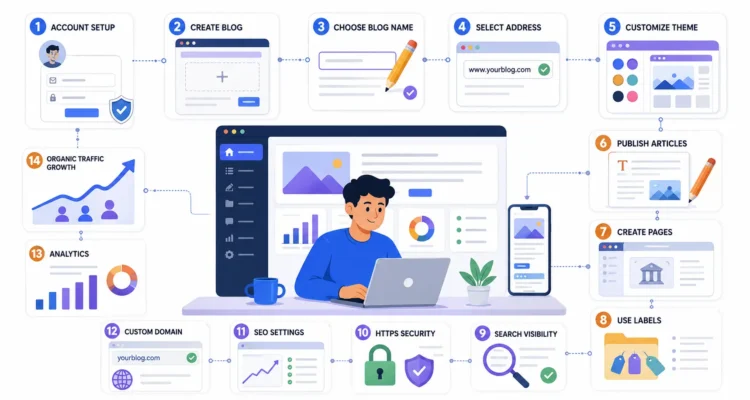
How to Create a Blogger Blog: 10 Easy Steps for Beginners

Starting a blog is one of the easiest ways to publish your ideas, tutorials, experiences, opinions, and useful information online. If you are completely new to blogging and do not want to deal with hosting or complicated technical setup, learning how to create a Blogger blog can be a simple way to get started.
Blogger is Google’s blogging platform that allows you to create and manage a blog using a Google Account. You can start with a free Blogspot address, publish posts, create pages, organize content with labels, customize your theme, and later connect a custom domain if you want a more professional web address.
This updated guide explains how to create a Blogger blog step by step using the current Blogger setup. We will also cover important settings, HTTPS, search visibility, pages, labels, custom domains, SEO preparation, and what you should do after publishing your first post.
If you are building a serious blog and want to understand the complete growth process beyond setup, read our Blogging and SEO Guide after completing this tutorial.
Table of Contents
What Is a Blog?
Before learning how to create a Blogger blog, it helps to understand what a blog actually is.
A blog is a website or section of a website where content is regularly published as posts. A blog post may contain text, images, videos, links, lists, tutorials, reviews, opinions, or other forms of information.
People use blogs for many different purposes, including:
- Sharing personal experiences
- Teaching skills
- Publishing tutorials
- Writing product reviews
- Covering news or industry topics
- Building a personal brand
- Promoting a business
- Sharing professional expertise
- Building an audience
- Creating future monetization opportunities
A blog can focus on one specific niche or cover several closely related topics.
What Is Blogger?
Blogger is a blogging platform operated by Google. It allows users with a Google Account to create and manage blogs without purchasing traditional web hosting.
If you want to learn how to create a Blogger blog, one of the biggest advantages is that the basic setup is relatively simple. You do not need to install a content management system or manually configure a server before publishing your first article.
Blogger provides features such as:
- Blog creation and publishing
- Free Blogspot addresses
- Custom domain support
- Post and page management
- Theme customization
- Labels for organizing posts
- HTTPS support
- Search visibility settings
- Reader and author permissions
You can review Google’s official Blogger Help Center whenever you need current instructions for specific Blogger features.
Why Use Blogger for Your First Blog?
People searching for how to create a Blogger blog are often beginners who want to experiment with blogging before investing heavily in a website.
Blogger can be useful because:
- It is relatively easy to set up
- You can begin with a free Blogspot URL
- You do not need separate hosting for a basic Blogger blog
- It integrates with your Google Account
- It supports custom domains
- HTTPS is supported
- You can create multiple posts and pages
- You can customize themes and layouts
However, Blogger is not the only blogging option. WordPress and other content management systems may provide greater flexibility for advanced sites. If you want more design freedom, plugins, advanced SEO tools, or custom functionality, you may eventually prefer another platform.
For beginners, though, learning how to create a Blogger blog is still useful because it teaches the fundamentals of publishing, navigation, categories or labels, pages, content structure, and basic SEO.
What Do You Need Before Creating a Blogger Blog?
You do not need much before learning how to create a Blogger blog.
Prepare these things first:
- A Google Account
- A blog topic or niche
- A possible blog name
- A few ideas for your first articles
- A simple plan for your categories or labels
You can create the basic blog quickly, but spending a little time on your niche and name can prevent unnecessary changes later.
Step 1: Choose Your Blog Niche
The first practical step in how to create a Blogger blog is deciding what you want to publish.
Your niche is the main subject or group of related subjects your website will cover.
Examples include:
- Technology
- Travel
- Personal finance
- Food
- Fitness
- Education
- Blogging
- SEO
- Home improvement
- Career advice
A focused niche can make it easier to create useful content and build an audience.
Ask yourself:
- What topics can I write about consistently?
- What questions does my target audience ask?
- Can I create dozens of useful articles around this subject?
- Do I have experience or genuine interest in the topic?
If you are unsure what to publish, you can also explore our guide to popular and trending blog topics for inspiration.
Step 2: Sign In to Blogger
The next step in how to create a Blogger blog is signing in to Blogger.
Visit Blogger and sign in with your Google Account.
If you are already signed into Google in your browser, Blogger may automatically recognize that account.
Make sure you select the Google Account you actually want to use for managing the blog, especially if you have separate personal and business accounts.
Step 3: Create a New Blog
Once you are signed in, you can begin the actual process of how to create a Blogger blog.
According to Blogger’s current official instructions:
- Sign in to Blogger.
- Open the blog selector or dropdown.
- Choose New blog.
- Enter a name for your blog.
- Click Next.
- Choose a blog address or URL.
- Click Save.
Google maintains the current steps in its official Blogger blog creation documentation.
Once these steps are complete, the basic Blogger site has been created.
Step 4: Choose a Good Blog Name
Your blog name is an important part of how to create a Blogger blog because it becomes part of your brand identity.
A good blog name should ideally be:
- Easy to remember
- Easy to spell
- Relevant to your niche
- Short enough to recognize quickly
- Flexible enough for future content
Avoid choosing an extremely narrow name if you think your content may expand later.
For example, a blog named “Laptop Buying Tips” may feel restrictive if you eventually want to cover smartphones, software, accessories, AI tools, and other technology topics.
Step 5: Choose Your Blogspot Address
A key part of how to create a Blogger blog is selecting the blog address.
By default, Blogger can provide a Blogspot address such as:
yourblogname.blogspot.com
The exact address you want must be available.
Try to choose an address that is:
- Short
- Relevant
- Easy to type
- Easy to remember
- Free from unnecessary characters
Do not force keywords into the address purely because you think it will automatically rank your site higher. Your content quality, structure, relevance, user experience, and broader SEO strategy matter much more than trying to create a keyword-heavy URL.
Step 6: Review the Important Blogger Settings
Creating the site is only the beginning of how to create a Blogger blog. Before publishing lots of articles, spend time reviewing your Blogger settings.
Google’s official Blogger settings documentation includes controls for privacy, publishing, HTTPS, permissions, posts, comments, formatting, and other blog features.
Important areas to review include:
- Blog title
- Description
- Blog language
- Privacy
- Search engine visibility
- Publishing address
- HTTPS
- Reader access
- Comments
- Formatting
We also have a dedicated Blogger settings guide that you can use after creating your blog.
Step 7: Make the Blog Visible to Search Engines
If your goal in learning how to create a Blogger blog is eventually getting organic traffic, check the search visibility setting.
In Blogger, go to:
Settings → Privacy → Visible to search engines
Enable this option if you want search engines to be allowed to find your public blog.
Blogger’s current help documentation confirms that the Visible to search engines setting controls whether search engines are allowed to find the blog. You can review Google’s Blogger settings guide for current options.
Remember that enabling search visibility does not guarantee rankings or indexing. It simply avoids intentionally preventing normal search discovery through that Blogger setting.
For deeper optimization, continue with our SEO settings for Blogger guide.
Step 8: Enable HTTPS and Secure Access
Security is another important part of how to create a Blogger blog.
Blogspot addresses use HTTPS, and Blogger also supports HTTPS for properly configured custom domains.
Google explains that HTTPS helps visitors verify that they are reaching the correct site and protects data from being modified or intercepted while travelling between the browser and website.
You can read Google’s official Blogger HTTPS guide for the current setup.
If you use a custom domain, review your HTTPS availability and redirect settings after connecting the domain.
Step 9: Choose and Customize Your Blogger Theme
Design plays an important role in how to create a Blogger blog because visitors need to be able to read and navigate your content comfortably.
Blogger provides themes that can be customized from the dashboard.
When choosing or editing a theme, prioritize:
- Readable text
- Mobile responsiveness
- Clear navigation
- Fast loading
- Simple layouts
- Visible content areas
- Consistent colors and spacing
A visually complicated theme is not automatically better.
If you are considering Blogger’s standard design options, read our article explaining why Blogger’s default theme may not always be ideal for a growing blog.
Step 10: Publish Your First Blog Post
The final core step in how to create a Blogger blog is publishing your first article.
Google’s current Blogger instructions for creating a post are straightforward:
- Sign in to Blogger.
- Select New Post.
- Create your post.
- Use Preview if you want to check the appearance.
- Save it as a draft or click Publish.
You can review the official Blogger post management guide for current publishing options.
Your first article should not simply announce that your blog exists. Try to publish something genuinely useful for your intended audience.
If writing is difficult, read our guide on how to write a captivating blog post.
How to Use Labels in Blogger
Understanding labels is useful after learning how to create a Blogger blog.
Labels help organize related posts into groups. Readers can use labels to find related content.
For example, a technology blog might use labels such as:
- Artificial Intelligence
- Smartphones
- Software
- Cybersecurity
Google’s current Blogger publishing documentation confirms that you can add labels while editing a post and separate multiple labels with commas.
Avoid creating dozens of nearly identical labels. Keep your organization simple and meaningful.
Create Important Pages for Your Blogger Blog
Another important stage after learning how to create a Blogger blog is creating permanent pages.
Posts are ideal for ongoing articles, while pages are better for information that should remain easy to find.
Common pages include:
- About
- Contact
- Privacy Policy
- Disclaimer
- Terms and Conditions where appropriate
Blogger allows users to create pages and display them in menus or side sections. Google’s official Blogger pages documentation explains how to create and display pages.
These pages can improve transparency and make your blog feel more complete.
Should You Add a Custom Domain?
Once you understand how to create a Blogger blog, you may want to replace your Blogspot URL with your own domain.
For example:
Before:
mygreatblog.blogspot.com
After:
www.mygreatblog.com
A custom domain can provide:
- Stronger branding
- A more memorable address
- A more professional appearance
- Greater control over your long-term brand identity
Blogger officially supports connecting registered custom domains. Google’s current custom domain setup guide explains the required Blogger and DNS configuration.
Do not change domains casually after building traffic. URL changes should always be planned carefully.
Connect Blogger to Google Search Console
If organic search matters to you, Search Console is a useful next step after learning how to create a Blogger blog.
Google Search Console can help you monitor how your website appears in Google Search, including queries, pages, clicks, impressions, indexing information, and selected technical issues.
We have a complete tutorial explaining how to connect a Blogger blog to Google Search Console.
This is especially useful once you begin publishing multiple articles and want to understand which pages Google is discovering.
Basic SEO After Creating a Blogger Blog
Knowing how to create a Blogger blog does not automatically mean people will find it through search engines.
After setup, learn the basic principles of search engine optimization.
Start with:
- Useful original content
- Clear post titles
- Relevant keywords
- Logical headings
- Internal linking
- Image alt text
- Fast-loading images
- Search-friendly navigation
- Mobile usability
- Regular content updates
If SEO is new to you, read our guide explaining what search engine optimization is.
You can also review Google’s general SEO Starter Guide for official guidance on helping search engines understand content.
Write Content Before Thinking About Monetization
Many beginners learn how to create a Blogger blog because they eventually want to earn money online.
Monetization can become part of a blogging strategy, but your first priority should be creating something worth visiting.
Focus on:
- Publishing useful articles
- Building topic depth
- Improving SEO
- Creating good navigation
- Developing an audience
- Improving old content
When your website becomes more established, you can explore options such as advertising and affiliate marketing.
Our AdSense approval eligibility guide explains what you should understand before applying for Google AdSense.
You can also read our affiliate marketing guide and guide on how to make money by blogging.
Common Mistakes When Creating a Blogger Blog
A complete guide to how to create a Blogger blog should also explain common mistakes beginners make.
Choosing a Very Narrow Blog Name
Your interests may expand over time. Avoid a name that makes future growth unnecessarily difficult.
Publishing Without a Content Plan
Random publishing can make your site difficult to organize. Choose several main topics and build related posts around them.
Creating Too Many Labels
Use labels to organize content, not to create a new label for every minor keyword variation.
Ignoring Search Visibility
If you want organic search traffic, verify that the blog is allowed to be visible to search engines.
Using Poor Navigation
Visitors should be able to find your important pages and related articles easily.
Using Huge Images
Large image files can slow down pages. Resize and optimize images before uploading them.
Publishing Copied Content
Create original articles rather than copying other websites.
Trying to Monetize Immediately
Build useful content and website quality before treating monetization as your main objective.
How to Create a Blogger Blog That Can Grow Long Term
Learning the technical steps of how to create a Blogger blog takes only a short time. Building a valuable blog takes much longer.
For long-term growth:
- Choose a focused niche.
- Create a clear content structure.
- Publish genuinely useful posts.
- Use relevant labels.
- Create important pages.
- Use internal links.
- Learn basic SEO.
- Connect Search Console.
- Optimize images.
- Review mobile usability.
- Refresh older content.
- Build an audience gradually.
This is the difference between simply knowing how to create a Blogger blog and knowing how to build a blog that continues improving after launch.
Blogger Blog Setup Checklist
Use this checklist after following our how to create a Blogger blog tutorial:
- Google Account selected
- Blog created
- Blog name chosen
- Blogspot URL selected
- Description added
- Search visibility reviewed
- HTTPS reviewed
- Theme customized
- Navigation configured
- Important pages created
- Labels planned
- First useful article published
- Internal links added
- Images optimized
- Search Console considered
- SEO settings reviewed
If you have completed these items, you have covered the main foundations of how to create a Blogger blog.
Frequently Asked Questions About Creating a Blogger Blog
How do I create a Blogger blog?
To learn how to create a Blogger blog, sign in to Blogger with your Google Account, choose New blog, enter a blog name, select an available blog address, and save the blog. You can then customize the theme, review settings, and begin publishing posts.
Is Blogger free to use?
You can create a basic Blogger site using a Blogspot address without purchasing separate hosting. Optional costs may arise if you purchase a custom domain or other external services.
Do I need hosting for Blogger?
You do not need to purchase conventional third-party hosting to create a standard Blogspot blog.
Can I use my own domain with Blogger?
Yes. Blogger supports custom domains. You need to purchase a domain and configure the required domain settings according to Blogger’s current instructions.
Does Blogger support HTTPS?
Yes. Blogspot addresses use HTTPS, and Blogger also supports HTTPS for appropriately configured custom domains.
Can Blogger appear in Google Search?
Public Blogger pages can be discovered by search engines. Make sure the Visible to search engines option is enabled if you want your blog to be discoverable, while remembering that visibility does not guarantee indexing or ranking.
Can I make money from a Blogger blog?
A Blogger site can potentially be monetized if it meets the requirements of the monetization method you choose. Build useful content and an audience before focusing heavily on revenue.
Is Blogger good for beginners?
Blogger can be a useful beginner platform because the basic setup and publishing process are relatively straightforward.
Should I use a Blogspot URL or custom domain?
A Blogspot URL is suitable when learning how to create a Blogger blog or experimenting with blogging. A custom domain may be preferable if you are building a long-term brand.
What should I publish first?
Publish an article that answers a real question in your niche. Avoid using your first post only to welcome visitors if you can instead provide useful information immediately.
Final Thoughts on How to Create a Blogger Blog
Learning how to create a Blogger blog is relatively simple. You need a Google Account, a blog name, an available address, and a clear idea of what you want to publish.
The basic creation process takes only a few steps, but successful blogging requires more than opening an account. Review your Blogger settings, enable appropriate search visibility, use HTTPS, create important pages, choose a clean theme, organize posts with labels, and publish useful original content.
Once you understand how to create a Blogger blog, your next priority should be improving the quality and structure of the site rather than immediately chasing traffic or monetization.
Continue learning SEO, build internal links between related articles, connect your site to useful webmaster tools, and regularly improve older content.
For the full strategy after learning how to create a Blogger blog, continue with our Blogging and SEO Guide, which covers content creation, search optimization, growth, engagement, and monetization.