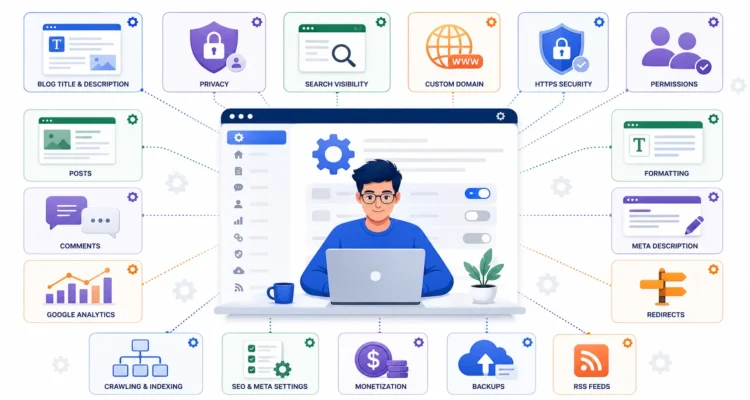
Blogger SEO Settings: 12 Essential Steps to Improve Search Visibility

Creating a Blogger blog is easy, but publishing articles alone does not automatically make them visible in Google Search. To build a stronger search foundation, you should review the most important Blogger SEO settings before publishing large amounts of content.
The right Blogger SEO settings can help search engines discover your public pages, understand your content, follow useful links, process redirects, and display relevant information in search results. However, SEO settings alone cannot guarantee rankings. Content quality, search intent, internal linking, page experience, and consistent publishing still matter.
This updated guide explains the essential Blogger SEO settings beginners should review, including search visibility, meta descriptions, permalinks, HTTPS, custom redirects, robots.txt, robots header tags, Search Console, image optimization, internal linking, mobile usability, and content structure.
If you have not configured the general options first, read our complete Blogger Settings Guide. You can also follow our Blogging and SEO Guide for the broader strategy behind content, traffic, promotion, and monetization.
Table of Contents
What Are Blogger SEO Settings?
Blogger SEO settings are the Blogger configuration options and publishing practices that can influence how search engines discover, crawl, understand, and display your blog content.
These settings can include:
- Search engine visibility
- Blog search description
- Post search descriptions
- Custom permalinks
- HTTPS
- Custom redirects
- Robots.txt
- Robots header tags
- Google Search Console
- Image alt text
- Internal links
- Mobile-friendly themes
Blogger’s official blog settings documentation includes search description, custom redirects, custom robots.txt, custom robots header tags, Search Console, custom ads.txt, and other site-management options.
The important point is that not every advanced option needs to be changed. Good Blogger SEO settings often involve leaving safe defaults alone and only modifying settings when there is a clear reason.
1. Make Your Blog Visible to Search Engines
The first of the essential Blogger SEO settings is search visibility.
Go to:
Blogger Dashboard → Settings → Privacy → Visible to search engines
For a public blog that you want search engines to discover, this option should normally be enabled.
This setting tells Blogger that search engines may find your blog. It does not guarantee indexing or rankings, but disabling it can interfere with normal search discovery.
For a broader explanation of how Google discovers and understands websites, read Google’s official SEO Starter Guide.
After enabling visibility, continue improving your content and technical setup instead of expecting immediate search traffic.
2. Enable the Blog Search Description
The next important part of Blogger SEO settings is the search description.
Go to:
Settings → Meta tags → Enable search description
Once enabled, Blogger allows you to enter a description summarizing what your blog is about.
A good blog search description should:
- Describe the site’s main subject
- Use natural language
- Include relevant terminology
- Avoid keyword stuffing
- Match the content actually published
For example, a technology blog might use a description such as:
Practical technology guides covering software, artificial intelligence, cybersecurity, gadgets, and digital tools.
Strong Blogger SEO settings help clarify your site, but descriptions should still be written for humans rather than search engines.
Google explains in its official search snippet guidance that snippets are usually generated from page content, although a useful meta description may sometimes be used.
3. Write a Search Description for Important Blog Posts
After enabling the blog-level search description, review the post editor when creating important articles.
A useful post description summarizes the individual page and may help search engines understand what information the page contains.
Google supports the standard description meta tag and documents supported page metadata in its meta tags and attributes guide.
For strong Blogger SEO settings, each major article should have a unique description rather than using the same text across many pages.
A useful description should generally:
- Match the article topic
- Include the focus subject naturally
- Explain what the reader will learn
- Avoid misleading claims
- Avoid copying another page’s description
4. Use Clear and Descriptive Permalinks
Permalinks are another important part of Blogger SEO settings and content publishing.
When creating a post, Blogger provides a permalink option in the post settings. A readable URL makes the page easier for users to recognize and manage.
A good permalink should generally be:
- Short
- Readable
- Related to the article
- Free from unnecessary words
- Easy for users to understand
For example:
Better:
/blogger-seo-settings.html
Less useful:
/post-273849-example-random.html
Do not force every possible keyword into the URL. A concise descriptive permalink is usually easier to manage.
Google’s SEO Starter Guide also recommends clear, descriptive URLs and site organization where practical.
5. Use HTTPS for a Secure Blog
HTTPS is an important technical part of your overall Blogger SEO settings.
Blogger supports HTTPS, and Blogspot addresses use secure HTTPS connections. Custom domains can also use Blogger’s HTTPS configuration when correctly set up.
HTTPS helps protect information exchanged between a visitor’s browser and the website.
For a normal public blog, make sure the secure version loads correctly and that you are not accidentally serving mixed insecure resources.
Security alone will not rank a page, but maintaining a properly functioning HTTPS site is part of a professional technical setup.
6. Use Custom Redirects When URLs Change
Custom redirects are one of the most useful Blogger SEO settings when an article or page URL changes.
Suppose you delete an old article and replace it with a newer page covering the same subject. Instead of leaving visitors on a broken URL, you can redirect the old path to the new relevant page.
Go to:
Settings → Errors and redirects → Custom redirects
Blogger currently allows you to enter:
- The old URL
- The destination URL
- Whether the redirect is permanent
When the old page has genuinely moved permanently, use the permanent redirect option. Avoid redirecting unrelated deleted articles to the homepage just to eliminate 404 pages.
Redirect only when there is a genuinely relevant replacement.
7. Be Careful With Custom Robots.txt
One of the most commonly misunderstood Blogger SEO settings is custom robots.txt.
Blogger currently provides:
Settings → Crawlers and indexing → Enable custom robots.txt
When enabled, your custom robots.txt configuration controls crawler access instead of relying entirely on Blogger’s default behavior.
This means a mistake can affect how crawlers access parts of your website.
For beginners, the safest approach is usually:
Leave custom robots.txt OFF unless you have a specific technical reason to change it.
Do not copy a robots.txt block from an old tutorial without understanding every directive.
Google provides detailed guidance on crawling controls in its robots.txt documentation.
Good Blogger SEO settings are not about enabling every advanced switch. Sometimes the correct optimization is leaving the default configuration unchanged.
8. Use Custom Robots Header Tags Only When Necessary
Custom robots header tags are another advanced area of Blogger SEO settings.
Blogger currently provides:
Settings → Crawlers and indexing → Enable custom robots header tags
These settings can influence how search engines handle certain pages.
Google documents robots directives such as:
- Noindex
- Nofollow
- Snippet controls
- Image preview controls
- Archive-related directives
Google’s official robots meta tag and X-Robots-Tag documentation explains how these directives can influence indexing and search presentation.
For most beginner blogs, leave custom robots header tags at Blogger’s default configuration unless you have a specific indexing requirement.
Do not rely on outdated “SEO robots generators” that tell every Blogger site to use the exact same configuration.
9. Connect Blogger to Google Search Console
One of the most useful tools connected to Blogger SEO settings is Google Search Console.
Blogger’s Settings section includes access to Google Search Console under Crawlers and indexing.
Search Console can help you understand:
- Which queries trigger your pages
- Which pages receive impressions
- Which pages receive clicks
- Whether Google has indexed important URLs
- Whether certain pages have indexing issues
- How your pages perform over time
You can access the official Google Search Console directly.
If you need help with setup, follow our complete guide on how to connect Blogger to Google Search Console.
Connecting Search Console does not automatically improve rankings, but it gives you valuable information for evaluating your Blogger SEO settings and content performance.
10. Optimize Blogger Post Titles and Headings
Technical Blogger SEO settings work best when your content is also well structured.
Every article should have a clear title that tells readers what the page is about.
Good post titles should:
- Describe the topic clearly
- Match search intent
- Use the main keyword naturally
- Avoid misleading clickbait
- Be different from unrelated pages
Google explains in its official title link documentation that clear, descriptive, concise titles help users understand what a search result is about.
Inside the content, use headings to organize major sections.
A logical structure normally includes:
- Main post title
- Major sections
- Supporting subsections
Do not create headings only to insert keywords. They should help the reader navigate the article.
11. Add Labels to Organize Related Content
Labels are not a magic ranking factor, but they can help organize Blogger content.
For example, a blogging website could use labels such as:
- Blogger
- SEO
- Content Writing
- Monetization
Use labels consistently instead of creating dozens of nearly identical variations.
Good site organization supports your overall Blogger SEO settings strategy because visitors can more easily discover related posts.
12. Optimize Images for SEO and Performance
Image optimization should be part of your Blogger SEO settings workflow even though not every image control lives in the main Settings page.
Before uploading images:
- Resize oversized files
- Compress images
- Use descriptive filenames
- Add useful alt text
- Avoid unnecessarily large images
- Use appropriate modern image formats where possible
For example:
Weak filename:
IMG-44827.jpg
Better filename:
blogger-seo-settings-guide.webp
Useful alt text should describe the image accurately instead of stuffing keywords.
Google’s official Image SEO best practices recommends relevant images near useful text and descriptive information that helps search engines and users understand the image.
Choose a Fast and Responsive Blogger Theme
Your theme is not technically one switch inside Blogger SEO settings, but it can strongly affect usability and performance.
A good Blogger theme should ideally be:
- Responsive
- Easy to navigate
- Readable
- Lightweight
- Compatible with mobile screens
- Structured logically
- Free from excessive scripts
Do not choose a theme simply because it has hundreds of widgets or visual effects.
You can read our guide explaining why Blogger’s default theme may not always suit a growing blog.
Improve Internal Linking
Internal linking works alongside Blogger SEO settings to create relationships between your pages.
When you publish a new article, look for opportunities to link to related older content.
For example, this Blogger SEO guide naturally links to:
- How to Create a Blogger Blog
- Blogger Settings Guide
- Connect Blogger to Google Search Console
- Blogging and SEO Guide
Google’s SEO Starter Guide recommends useful internal links and descriptive anchor text because links help users and search engines discover related resources.
Relevant internal links help readers discover supporting information and help establish the relationship between related pages.
How to Create an SEO-Friendly Blogger Post
Once the main Blogger SEO settings are configured, use a consistent publishing workflow.
Step 1: Click New Post
From your Blogger dashboard, select New Post.
Step 2: Add a Clear Title
Create a descriptive title that accurately represents the article.
Step 3: Write Useful Content
Focus on answering the reader’s question thoroughly.
If writing content is difficult, read our guide on how to write a captivating blog post.
You can also review Google’s people-first content guidance when evaluating whether an article genuinely helps its intended reader.
Step 4: Add Headings
Use headings and subheadings to divide long articles into clear sections.
Step 5: Add Labels
Choose existing relevant labels instead of creating unnecessary new variations for every post.
Step 6: Set the Permalink
Where appropriate, use a short custom permalink related to the topic.
Step 7: Add the Search Description
Write a unique description summarizing the article.
Step 8: Add Internal Links
Connect the article to relevant supporting pages.
Step 9: Optimize Images
Add descriptive alt text and keep image files reasonably lightweight.
Step 10: Preview Before Publishing
Check how the article appears on desktop and mobile before publishing.
This publishing process works together with your Blogger SEO settings to create a more search-friendly and user-friendly blog.
Should You Enable Custom Ads.txt?
Blogger includes an option called:
Settings → Monetization → Enable custom ads.txt
This setting is related to advertising rather than normal organic search optimization.
Blogger’s official advertising guide explains how publishers using third-party advertising or manually integrated AdSense can configure custom ads.txt.
Do not enable custom ads.txt just because it appears near other advanced Blogger SEO settings.
Enable or edit it when your advertising provider gives you the appropriate record or when your monetization setup specifically requires it.
If you are preparing your blog for advertising, read our updated AdSense approval eligibility guide.
Do Blogger SEO Settings Guarantee Google Rankings?
No. Correct Blogger SEO settings create a healthier technical foundation, but they cannot guarantee a particular Google ranking.
Search visibility also depends on factors such as:
- Content usefulness
- Search intent
- Competition
- Website structure
- Internal links
- Page experience
- Originality
- External references
- Content freshness
The purpose of Blogger SEO settings is to remove unnecessary technical obstacles and help search engines understand and access your content correctly.
Google’s official SEO Starter Guide is a useful reference for understanding what site owners can realistically influence and what SEO cannot guarantee.
How Long Does Blogger SEO Take?
Another common misconception is that changing Blogger SEO settings should make a new blog rank the next day.
That is not how organic search works.
Search engines need time to:
- Discover pages
- Crawl content
- Process changes
- Index eligible pages
- Evaluate pages for relevant searches
Google notes in its title link documentation that after page changes, recrawling and reprocessing can take from a few days to a few weeks.
A new blog should focus on publishing useful content consistently rather than checking rankings every few hours.
Search Console can help you monitor impressions, clicks, and indexing over time.
Common Blogger SEO Settings Mistakes
Avoid these common mistakes when configuring Blogger SEO settings.
Turning Search Visibility Off
If you want organic traffic, make sure your public blog is allowed to be visible to search engines.
Copying Random Robots.txt Code
Do not paste old robots.txt templates simply because another blog claims they are “perfect SEO settings.”
Enabling Every Robots Header Tag
Robots directives affect indexing and search presentation. Only change them when you understand their purpose.
Using the Same Search Description Everywhere
Create relevant descriptions for important pages rather than duplicating one description across the website.
Using Long or Confusing Permalinks
Keep URLs readable and related to the article topic.
Ignoring Redirects
If a valuable page moves permanently, redirect the old URL to the relevant replacement.
Using Oversized Images
Large files can make pages unnecessarily heavy.
Ignoring Mobile Users
Always check how your theme and posts appear on phones.
Expecting Settings to Replace Quality Content
No combination of Blogger SEO settings can compensate for thin, copied, or unhelpful articles.
Recommended Blogger SEO Settings Checklist
Use this Blogger SEO settings checklist when reviewing your site:
- Visible to search engines: ON for a public blog
- Blog search description: Enabled
- Important post descriptions: Added
- HTTPS: Working correctly
- Permalinks: Clear and descriptive
- Custom redirects: Used when relevant URLs move
- Custom robots.txt: Default unless genuinely needed
- Custom robots header tags: Default unless genuinely needed
- Google Search Console: Connected
- Images: Optimized
- Alt text: Descriptive
- Labels: Organized
- Internal links: Added naturally
- Theme: Mobile responsive
- Navigation: Clear
- Content: Useful and original
This combination gives most beginners a solid foundation without overcomplicating Blogger SEO settings.
Frequently Asked Questions About Blogger SEO Settings
What are Blogger SEO settings?
Blogger SEO settings are Blogger configuration options and publishing practices that help search engines access, understand, and display your blog content more effectively.
Should Visible to Search Engines be enabled?
Yes, for a normal public blog that you want search engines to discover, the Visible to search engines option should generally be enabled.
Should I enable custom robots.txt in Blogger?
Most beginners do not need custom robots.txt. Blogger provides a default configuration, and incorrect custom rules can interfere with crawling.
Should I enable custom robots header tags?
Leave them at their default configuration unless you have a specific indexing or search-presentation requirement and understand what the directives do.
Do Blogger SEO settings guarantee rankings?
No. Blogger SEO settings help create a search-friendly technical foundation, but rankings depend on many additional factors, including content quality, search intent, competition, and site structure.
Should every Blogger post have a search description?
Important SEO-focused posts benefit from a clear unique description that accurately summarizes the page.
Can Blogger posts use custom permalinks?
Yes. Blogger allows you to customize a post permalink through the post editor. Keep the permalink concise, readable, and related to the page topic.
Does Blogger work with Google Search Console?
Yes. Blogger provides access to Google Search Console from its Crawlers and indexing settings, and Search Console can be used to monitor search performance and indexing.
Should custom ads.txt be enabled for SEO?
No. Custom ads.txt relates to advertising authorization rather than normal search optimization. Enable it when your advertising setup requires it.
How quickly will Blogger SEO settings improve rankings?
There is no fixed timeframe. Search engines need time to discover and process content, and correct settings alone do not guarantee ranking improvements.
Final Thoughts on Blogger SEO Settings
Proper Blogger SEO settings can help build a healthier foundation for search visibility, but SEO should never become a collection of random switches and copied code.
Start with the fundamentals: allow search visibility for a public blog, enable a useful search description, use descriptive permalinks, keep HTTPS working, create relevant redirects, connect Search Console, optimize images, and build clear internal links.
Be especially cautious with advanced Blogger SEO settings such as custom robots.txt and robots header tags. Blogger already provides default behavior, and incorrect custom rules can create crawling or indexing problems.
Google’s official robots directive documentation is a much safer reference than copying configurations from random third-party tutorials.
After your Blogger SEO settings are configured, focus most of your effort on useful original content. Create articles that satisfy real search intent, organize them with relevant internal links, optimize important images, monitor Search Console, and improve older posts over time.
If you are setting up Blogger from the beginning, read our How to Create a Blogger Blog guide and Blogger Settings Guide.
For the complete strategy covering content creation, SEO, traffic, engagement, and monetization, return to our Blogging and SEO Guide.